
School Security Solutions
Preventing and Reducing School Threats
Understanding the evolving nature of school threats is essential for prevention and mitigation efforts. There has been a recent increase in threats from state-sponsored terror groups targeting schools, and it highlights the need for a comprehensive approach to address this issue.
School threats come from a wide variety of sources, and the mix changes constantly. Sometimes it is students. Sometimes it is foreign actors. Sometimes it is organized groups of school-age offenders. The landscape is fluid and shifts for many reasons. As one example, a recent online group of roughly 1,100 school-age members required proof of 200 completed swatting calls just to gain entry. Because the threat landscape changes this fast, a school without the technology to stop these threats will eventually become a victim.
Terror groups historically used email to send out threats, they have moved to Bot farms that use social media, auto-dialers, and free phone calling apps to deliver threats. Email is still one of their most-used channels — and most of these threats get through, because standard email filters and firewalls are not designed to stop them.
Copycats: When overseas groups commit threats and no one is caught, it gives students the false impression they can get away with making a threat and it increases the number of threats made by students.
Technology, education, behavioral health, and law enforcement can impact a student's willingness to commit a school threat, however, you cannot impact a terror group's willingness to commit a threat. The only way to stop threats from terror groups is to use technology that prevents them from gaining access to schools.
Pricing:
The cost is under $2.00 per student per year plus a one-time installation fee. Support hours can be purchased if required.

More instruction.
Less disruption.
Screen voice and email threats, focus authorized review, and organize evidence and context for informed response. Student-identifying data remains under district control by design.
Schedule a conversation → Watch the system overviewOne coordinated path from prevention to response
Screen incoming threats
Apply policy and minimize data
Organize relevant threat information for authorized review
Support PSAP and investigative review workflows
Prevent. Assess. Respond.
SAM works across the district’s existing voice and email environment, bringing the right evidence to the right authorized people without creating another system that demands constant attention.
Screen incoming threats
Apply district-defined screening before suspicious calls connect or messages reach staff.
Clarify credibility faster
Organize transcripts, technical signals, and related threat activity so the authorized team can make the decision.
Start with organized evidence
When escalation is authorized, give law enforcement a clearer, privacy-reviewed investigative starting point.
Products for prevention, privacy, and authorized response.
Each product performs a defined role within a coordinated operating model while authorized people retain control of consequential decisions.
SAM-Voice
Applies district-defined screening before a call connects and redirects suspicious threats into a controlled evidence workflow.
- Allow, block, redirect, or flag outcomes
- Recording, transcription, and threat scoring for redirected calls
- Per-call explanations and operational visibility
- Call continuity if screening is unavailable
SAM-911
SAM-911 is TDR’s swatting-prevention product for 911 centers and public-safety answering points. It is built on the same core software as SAM-Voice, with product-specific configuration and workflow differences for the 911 environment.
- Supports controlled review of suspicious inbound calls
- Uses the shared SAM-Voice core with PSAP-specific configuration
- Preserves dispatch personnel authority over emergency decisions
- Deployment scope and supported call paths are verified for each agency
SAM-Email
Screens incoming school email inside the district-controlled environment and routes suspicious messages into approved containment and review.
- Uses authentication evidence and threat patterns
- Preserves original messages and relevant technical records
- Supports Google Workspace and Microsoft environments
- Does not send raw student content to external AI
Student Privacy Engine
The Student Privacy Engine is designed to support district-controlled processing, data minimization, least privilege, and auditable human review.
- Keeps student-identifying data under district control by design
- Minimizes data before an authorized handoff
- Stops an outbound workflow when required privacy processing is unavailable
- Requires release and deployment verification
SAM-LE
SAM-LE is designed to help authorized law-enforcement personnel organize approved case information for human review.
- Organizes approved call or email evidence and technical details
- Supports review of relevant threat patterns
- Maintains human authority over investigation and legal process
- Availability and supported workflows depend on the verified agency deployment
Make the consequences clear before a threat is made.
SAM Education helps students, families, and the wider community recognize manipulation, understand that online threats can leave recoverable evidence, and know that the district takes every threat seriously. It supports awareness and deterrence without monitoring students’ private messaging or gaming accounts.
Public-safety context: FBI warning on violent online networks · FBI guidance on school hoax threats · UN reporting on recruitment of Ukrainian minors · Security Service of Ukraine anti-recruitment campaign
See when one threat is part of a wider pattern.
The SAM threat database helps authorized teams compare a new event with recent activity beyond their own district.
Earlier warning for schools
Alert authorized district teams when the same or a similar threat has appeared across other districts and states that morning or during the previous several days.
Faster context for investigators
Help law enforcement recognize repeated language, delivery methods, and technical patterns so an investigation can start with better-organized context.
Quiet by design. Managed by exception.
SAM is designed to operate continuously in the background. Staff engage when policy requires review—not to keep the system running.
Screen threats. Focus review. Respond with context.
Protect instruction, reduce unnecessary disruption, and give authorized teams a clearer path from the first signal to an informed response.
Schedule a SAM Suite conversation →School Access Manager
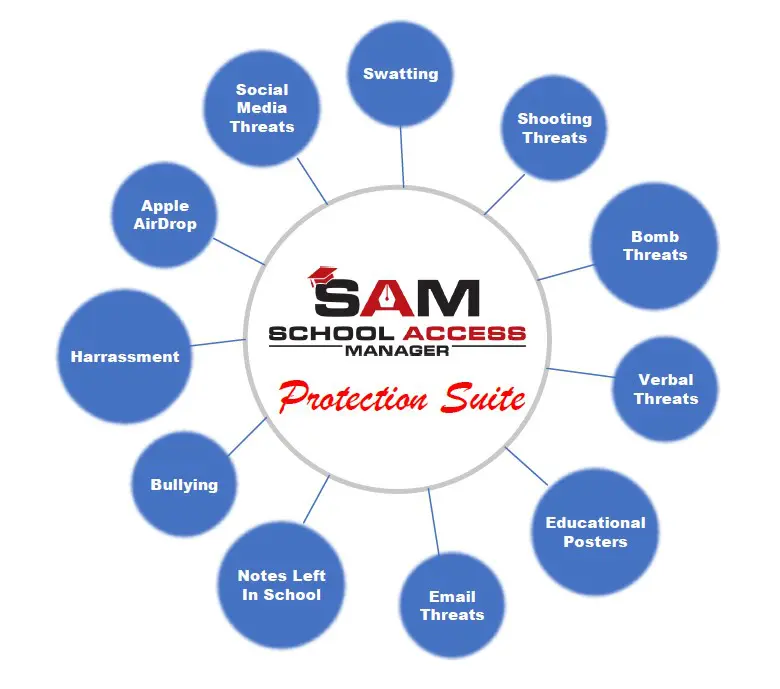
School Access Manager (SAM) is a suite of products. It prevents/reduces swatting, shooting threats, bomb threats, Apple AirDrop threats, social media threats, notes left in school, verbal threats, email threats, bullying, and harassment using advanced technology and innovation to ensure your school's safety and security.

SAM currently uses three approaches to prevent and reduce school threats.
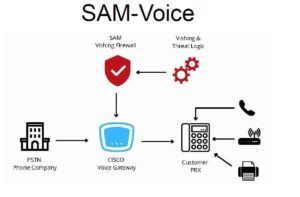
SAM-Voice looks at all incoming calls to determine who should be allowed into the school. Think of it like an electronic SRO.
Sam Voice is very effective against swatting and threats that are called into a school. These types of threats are impossible to stop without SAM-Voice and they are the threats that cause the largest loss of instructional hours.
Currently, AirDrop messages can’t be tracked. Even Apple cannot look at a message and determine who sent the message. AirDrop does not have an audit log, and the user information is encrypted.
This has created the ability to send anonymous messages in AirDrop. Some students have taken advantage of the messages being anonymous and sent threats using AirDrop. More recently, schools have had evacuations and lockdowns as a result of these anonymous AirDrop threats. This has led to lost instructional time, which impacts a student’s progress, increases emotional stress, and costs taxpayers money. Airlines are starting to experience the same AirDrop threat issues.
Solution
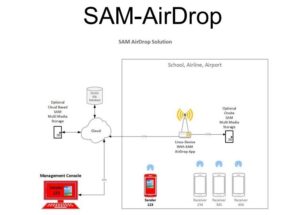
Installed network devices that capture airdrop information. Create an audit log and decrypt limited user information to identify the sender. The network devices must be installed before a message is sent to capture the message and create an audit log.
Simple User Interface
Photos are presented like a photo contact sheet; next to each photo, expose the phone number of the device that sent the photo.
We capture the email of the device that sent the message but do not decrypt the email. If validation in addition to the phone number of the device is required, allow an administrator to enter the email address associated with the device. The system will compare the email entered with the captured email and indicate if it matches.
Network Devices
Airdrop uses both Bluetooth and peer-to-peer Wi-Fi to communicate between devices.
The application runs on a standard Linux device, making the hardware affordable.
This also allows the users to use off-the-shelf features like POE (power over ethernet) and other standard hardware features. This makes the complete solution affordable.
Other Use Cases
In addition to preventing school threats, there are other use cases:
-
- AirDrop Threats
- Securing Test Environments
- Electronic Harassment
- Electronic Bulling
SAM-AirDrop monitors Apple AirDrop networks operating within the school. It creates an audit log of messages sent within the school including who the sender was. If a student sends a threat message it is easy to determine who the student was. This can also be used in cases where a student uses airdrop for harassment or bullying.
- Airline AirDrop Security
- Theft of data
- AirDrop and its logos are trademarks of Apple Inc.
 School Posters - We came up with a different, proactive prevention approach. We studied thousands of school threats and determined that most were viewed as harmless pranks. Even though we had a solution to prevent swatting, most adults and students still viewed most school threats as pranks. Our approach was to develop a database that could put a value on the threat. We felt if we could show the cost of a threat, it would start to change the perception from a prank to something more serious. We met with just under 50 school business officials and explained our methodology. By the time we were done, we had a formula that was acceptable. It took a great deal of work because every state has different requirements for the number of days and the number of hours. It took us over a year to collect all of that. Then we had to collect all the school budgets to apply our formula. That is a huge ongoing task.
When you combine our technology, the risk of consequences, and student education it is a very effective deterrent.
Posters
We provide the data to allow school posters to articulate the consequences of a threat:
- Criminal – List the penalties for making a school threat.
- Financial – List the amount of money a person can be held liable if they make a school threat.
We maintain a threat database for every school in the United States. The database maintains the instructional hour requirements of each state and the school budgets. We use this data to calculate the cost of an instructional hour.
Student Educational Videos
We create student educational videos that explain the various threats and how law enforcement and Congress have new tools that allow them to trace who sent the threat. Most videos will be less than 5 minutes and can be customized to each district upon request.
List of current and upcoming educational videos:
- Making Fake Threat calls and Swatting
- Social Media and TikTok threats
- Leaving threatening notes in school
- Email threats
- Verbal threats
Introduction Video
A Solution to School Threats
https://tdrtechnologysolutions.com/wp-content/uploads/2023/10/SAM-School-Threat-Prevention.mp4
SAM-Voice has been updated to protect 911 centers from swatting and other school threats that are called into 911 centers.